( ´・・)/개발
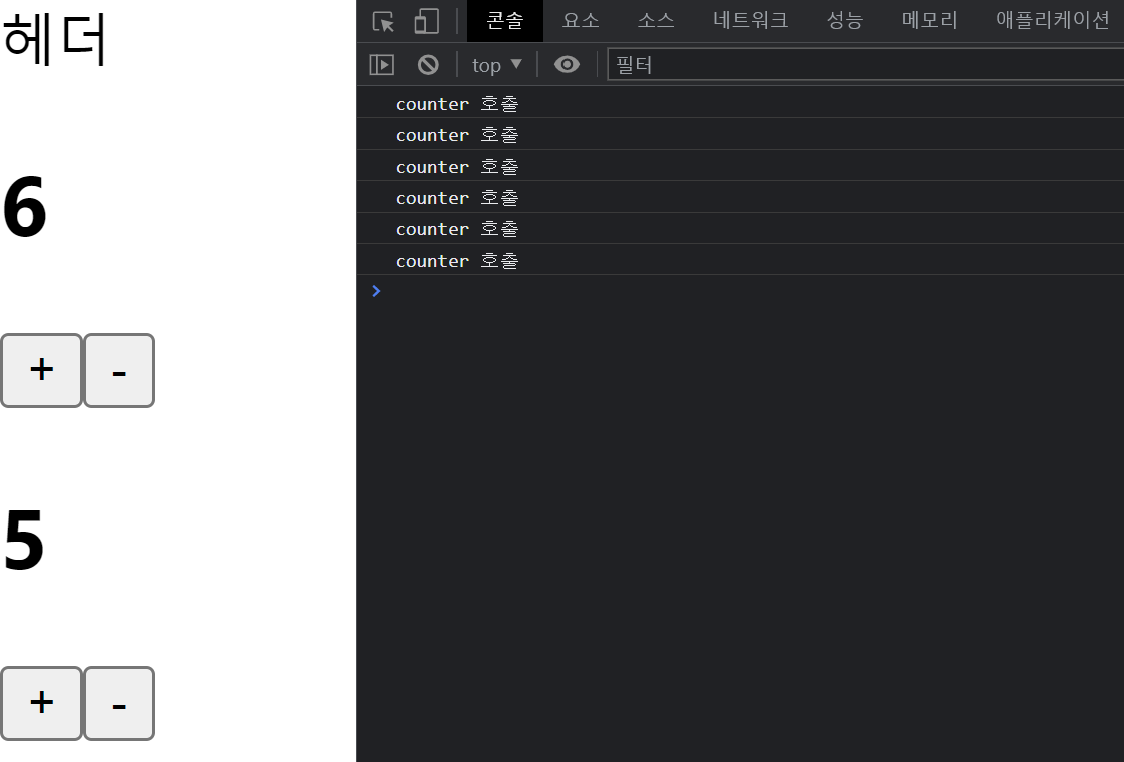
[React] State - Counter 호출
by shinsangah
2023. 4. 2.
import React, { useState } from "react";
// State는 React의 기능이기 때문에 React import 해줘야 함

const Counter = () => {
  // 아무것도 return 안하면 JSX는 에러남

  // 0에서 출발
  // 1씩 증가하고
  // 1씩 감소하는
  // Count 상태

  console.log("counter 호출");

  const [count, setCount] = useState(0);
  // useState 라는 React의 메서드는 배열을 반환하고, 배열의 비구조화 할당을 통해서
  // 0번째 index = count, 1번째 index = setCount 라는 상수로 받아온 것을 확인할 수 있다.
  // 0번째 index인 count는 상태의 값으로 사용이 되고, 그래서 이런식으로 <h2>{count}</h2> 값이기 때문에 JSX에서 return을 해서 화면에 표시할 수 있다.
  // 1번째 index, 두번째 인자인 setCount는 count 라는 상태를 변화시키는 상태변화 함수로써 사용하게 됩니다.
  // 그리고 useState 메서드를 호출하면서 넘겨준 인자인 0은 우리가 count 라는 상태를 만드는데에 초기값으로 사용하게 된다.

  const onIncrease = () => {
    setCount(count + 1);
  };

  const onDecrease = () => {
    setCount(count - 1);
  };

  const [count2, setCount2] = useState(0);

  const onIncrease2 = () => {
    setCount2(count2 + 1);
  };

  const onDecrease2 = () => {
    setCount2(count2 - 1);
  };

  return (
    <div>
      <h2>{count}</h2>
      <button onClick={onIncrease}>+</button>
      {/* React, JSX 에서는 이런식으로 onClick 카멜케이스와 중괄호를 통해 사용함 */}
      {/* <button onclick="onIncrease()">-</button> */}
      {/* html 쓸 때는 위처럼 그냥 소문자 onclick과 위같이 함수를 썼었음 */}
      <button onClick={onDecrease}>-</button>

      <h2>{count2}</h2>
      <button onClick={onIncrease2}>+</button>
      <button onClick={onDecrease2}>-</button>
    </div>
  );
};

export default Counter;


