데이터 타입 확인
typeof, .constructor, checkType
// 데이터 타입 확인

const a = 123;
console.log(typeof a); //number

console.log(typeof "Hello"); //string
console.log(typeof "Hello" === "string"); //true
console.log(typeof 123 === "number"); //true
console.log(typeof false === "boolean"); //true
console.log(typeof undefined === "undefined"); //true

console.log(typeof function () {}); //function (함수)
console.log(typeof function () {} === "function"); //true
console.log(typeof null); //object
null 이라는 데이터는 null 이 아니고, 'object' 라는 문자로 출력
console.log(typeof null === "null"); //false
console.log(typeof null === "object"); //true
console.log(typeof []); //object
[] 배열 데이터도 Array가 아닌, 'object' 라는 문자로 출력
console.log(typeof [] === "object"); //true
console.log(typeof {}); //object
console.log(typeof {} === "object"); //true
* null 과 배열 [], {} 객체 데이터는 전부다 같이 'object' 라는 단어로 확인이 된다.
=> typeof 라는 키워드를 사용할 수 없다. 다른 방식 사용 필요 ↓console.log([].constructor); //ƒ Array() { [native code] }
constructor 라는 속성을 입력하게 되면, 대문자 A로 시작하는 하나의 함수가 출력이 된다.
이 Array 라는 함수는 이미 자바스크립트에 들어있는 '전역 함수' 이다.
배열(Array) 데이터는 기본적으로 자바스크립트에 있는 대문자 A로 시작하는 이 Array 라는 이름의 함수에서 확장되서 만들어진 데이터이다.
[] 대괄호를 사용하는 모든 배열 데이터에서 constructor 속성을 사용하게 되면 배열 데이터에 해당하는 Array 전역 함수가 표시됨.
console.log([].constructor === Array); //true
console.log({}.constructor); //ƒ Object() { [native code] }
console.log({}.constructor === Object); //falseconsole.log(null.constructor); // error
console.log(Object.prototype.toString.call(null)); // [object Null]
console.log(Object.prototype.toString.call(null).slice(8, -1)); // Null
console.log(Object.prototype.toString.call(null).slice(8, -1) === "Null"); // true
null 이라는 데이터를 조금은 복잡하지만 이러한 개념을 통해서 구분이 가능해진다.
마지막 이 방식같은 경우에는 null 뿐만 아니고, 마지막 데이터들까지 전부 다 확인할 수 있다. 이 방법 추천!
공용화된 'checkType' 이라는 함수를 통해서 전부 다 데이터를 확인할 수 있다.
function checkType(data) {
return Object.prototype.toString.call(data).slice(8, -1);
}
console.log(checkType(null)); //Null
console.log(checkType(false)); //Boolean
console.log(checkType([])); //Array
console.log(checkType({})); //Object
console.log(checkType(123)); //Number
console.log(checkType("sangah")); //String
console.log(checkType(function () {})); //Function
console.log(checkType(undefined)); //Undefined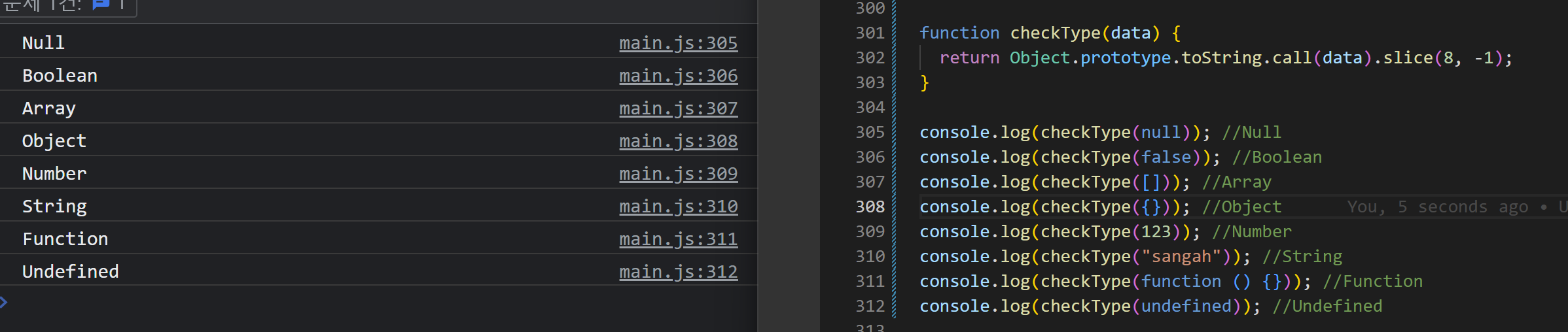
그리고 기존처럼 true 값을 출력하기 위해서 아래와 같이 첫글자를 '대문자'로 비교해주면,
문제없이 데이터의 타입을 비교할 수 있다.

console.log(checkType(null) === "Null"); //true
console.log(checkType(false) === "Boolean"); //true
console.log(checkType(undefined) === "Undefined"); //true
console.log(checkType([]) === "Array"); //true
console.log(checkType({}) === "Object"); //true
console.log(checkType(123) === "Number"); //true
console.log(checkType("sangah") === "String"); //true
console.log(checkType(function () {}) === "Function"); //true
typeof 키워드가 사용하기 제일 편리하기는 하지만,
null과 [ ] 배열 (Array), { } 객체 (Object) 데이터를 구분하기 어렵기 때문에 사용할 수 있는 새로운 방법이 있는데
새로운 방법 ([ ].constructor, { }.constructor) 은 null 데이터는 구분을 할 수 없기 때문에,
필요에 따라서 checkType 이라는 별도의 함수를 만들고,
그것으로 다른 데이터의 타입을 온전하게 확인할 수 있게 만들어주면 좋음.
** checkType 함수 잘 기억하기!
이 함수 안에 있는 prototype 이나, toString, call, slice 이런 메소드들은 뒤에서 또 학습할 것임.
지금 당장은 너무 어려워하지 말고, 이런 로직으로 코드를 작성한다는 것만 기억해두기.
'( ´・・) > 개발' 카테고리의 다른 글
| [JavaScript] 부정 (Negation), 비교 (Comparison) 연산자 (0) | 2023.05.01 |
|---|---|
| [JavaScript] 산술 (Arithmetic), 할당 (Assignment), 증감 (Increment & Decrement) 연산자 (0) | 2023.05.01 |
| [JavaScript] 참과 거짓 (Truthy & Falsy) (0) | 2023.05.01 |
| [JavaScript] 형 변환 (Type Conversion) (0) | 2023.05.01 |
| [JavaScript] 참조형 - Function (함수) (0) | 2023.05.01 |


